Speeding Up Webpack Build Time

As our feature grows, our code base also becomes gigantic and takes a lot of time to build. Most of us use a famous Webpack open-source module bundler to take care of lots of JS and CSS automated tasks with various plugins.
Webpack may perform fast in a small code base but it is painfully slow when we deal with 100s of components with lots of code lines. It takes more than 1 minute to simply run dev or prod and is even slower when run with the watch option.
Thankfully, Webpack has a cache mechanism that will dramatically reduce our compiling time. Below is the small script of cache config which I have used for the current Jobins project.
module.exports = ({
    // ...
    cache: {
        type: "filesystem",
        compression: "gzip",
        hashAlgorithm: "md4",
        allowCollectingMemory: true,
        name: cacheName,
        buildDependencies: {
            config: [__filename],
        },
        cacheDirectory: path.resolve(__dirname, `.temp_cache/${domain}`),
    },
    // ...
})
Above the config, we have used the filesystem over the memory cache location with multiple caches for our multiple front-end applications. With the filesystem, our cache will persist, unlike memory.
We have absorbed a 1m20sec build time reduced to 12-13 sec while doing the prod command and 20 sec for the dev command. Watch time has been reduced to 24 sec, which took 45 sec to reflect changes.
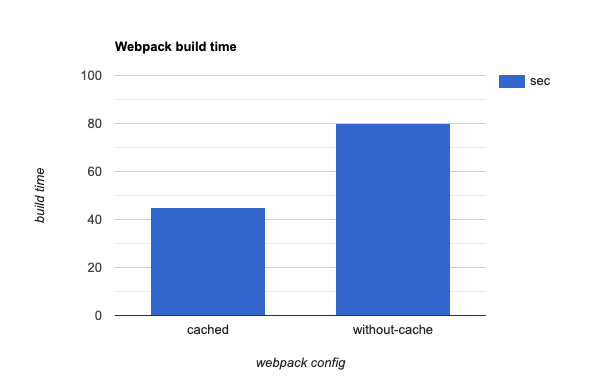
I have intentionally updated buildDependencies it with __filename to an invalid cache if any Webpack config is changed. To avoid conflict between multiple frontend applications I have modified cacheDirectory too.
At last, don't forget to update or add postinstall script to clear the cache directory on the npm package.json file.
"scripts": {
    "clear-cache": "mkdir -p .temp_cache && rm -rf .temp_cache",
    "postinstall": "test -n \"$NOYARNPOSTINSTALL\" || yarn clear-cache"
}
Above the postinstall script will delete and recreate the cache directory unless NOYARNPOSTINSTALL=0 is set after any package install.
You can read more and in details about Webpack Cache in their document here.
I hope this post will solve your tedious wait time for the Webpack build process.
PS: we are moving on to Vite for instance change reflect.