Laravel Valet alternative in Docker with Traefik
Valet is serving great but in some cases, it failed to fulfill the requirement of multiple specific versions of PHP and databases. I want to share the docker configuration to achieve almost the same configuration as valet using Docker. Below there is a diagram of docker architecture.
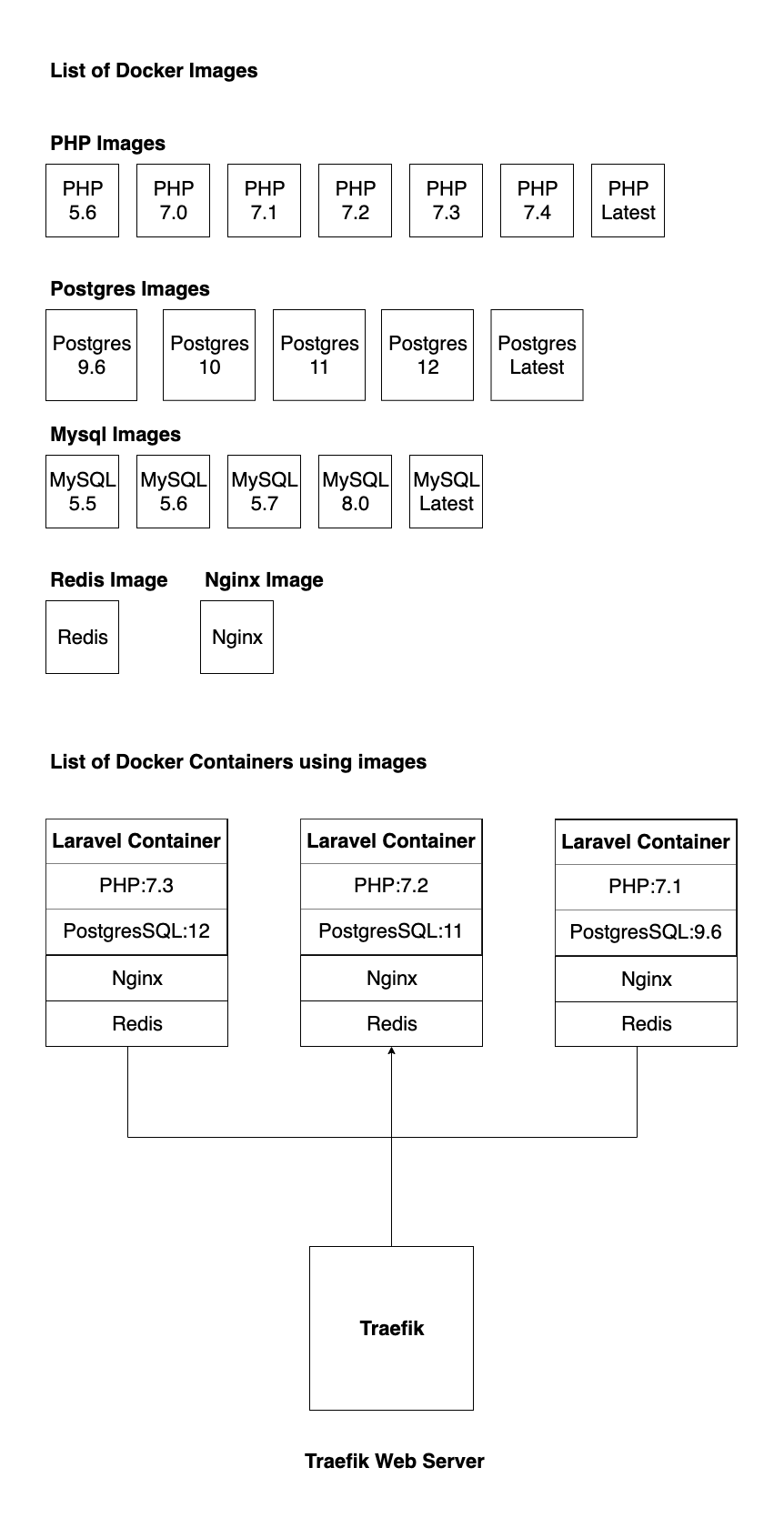
First of all, we prepared docker images which are customizable for Laravel with necessary PHP extensions, Composer and supervisor process manager.
FROM php:7.0-fpm
ENV APP_HOME /var/www/html
ARG USER_ID=1000
ARG GROUP_ID=1000

# reset www-data uuid for matching host user uuid
RUN userdel -f www-data &&\
if getent group www-data ; then groupdel www-data; fi &&\
groupadd -g ${GROUP_ID} www-data &&\
useradd -l -u ${USER_ID} -g www-data www-data

# install all the dependencies and enable PHP modules
RUN rm -rf /var/lib/apt/lists/partial && apt-get update -o Acquire::CompressionTypes::Order::=gz && \

apt-get update && apt-get upgrade -y && apt-get install -y \
procps nano git unzip zip libicu-dev zlib1g-dev libxml2 libxml2-dev libreadline-dev libzip-dev \
libpq-dev libmcrypt-dev libpng-dev pear-channels supervisor cron && \

pecl install redis && \

docker-php-ext-enable redis && \
docker-php-ext-configure pdo_mysql --with-pdo-mysql=mysqlnd && \
docker-php-ext-configure pgsql -with-pgsql=/usr/local/pgsql && \

docker-php-ext-install pdo_mysql pdo pdo_pgsql pgsql bcmath ctype json mbstring mcrypt tokenizer \
xml intl pcntl xmlrpc soap gd zip && \

rm -fr /tmp/* && \
rm -rf /var/list/apt/* && \
rm -r /var/lib/apt/lists/* && \

apt-get clean

# create document root
RUN mkdir -p $APP_HOME/public

# change owner
RUN chown -R www-data:www-data $APP_HOME

# put php config dir for Laravel
RUN mkdir -p /usr/local/etc/php-fpm.d/

# install composer
RUN curl -sS https://getcomposer.org/installer | php -- --install-dir=/usr/bin/ --filename=composer

# add supervisor
RUN mkdir -p /var/log/supervisor
RUN mkdir -p /var/spool/cron/crontabs/

# set working directory
WORKDIR $APP_HOME

# create composer folder for user www-data
RUN mkdir -p /var/www/.composer && chown -R www-data:www-data /var/www/.composer
USER www-data
Then prepare the standard Postgres and MySQL images for the docker-compose executable ready.
# docker-compose.yml
version: "3.7"
services:
  db:
    image: "postgres:10.11"
    container_name: "postgres_10.11"
    ports:
      - "5410:5432"
    volumes:
      - ~/.docker-stack/postgresql/10:/var/lib/postgresql/data
    networks:
      - postgresql
networks:
  postgresql:
    name: postgresql_10
Set up a Laravel Container using custom-built PHP and database images.
# docker-compose.yml
version: '3.7'
services:
  nginx:
    image: nginx
    container_name: "${APP_NAME}_nginx"
    restart: always
    volumes:
      - .:/var/www/html:ro
      - ./docker/nginx:/etc/nginx/conf.d/
    depends_on:
      - laravel
    links:
      - "laravel: ${APP_NAME}_laravel"
    labels:
      - "traefik.http.routers.${APP_NAME}.rule=Host(`${APP_NAME}.localhost`)"
      - "traefik.http.services.${APP_NAME}.loadbalancer.server.port=80"
      - "traefik.http.services.${APP_NAME}.loadbalancer.passhostheader=true"
      - "traefik.enable=true"
      - "traefik.docker.network=traefik_web"
    networks:
      - laravel
      - traefik_web
  laravel:
    image: php-70:latest
    container_name: "${APP_NAME}_laravel"
    command: bash -c "/usr/bin/composer install --no-interaction --no-progress && php-fpm & php -a"
    expose:
      - "9000"
    volumes:
      - .:/var/www/html
      - ./docker/php/www.conf:/usr/local/etc/php-fpm.d/www.conf
      - ./docker/php/php.ini:/usr/local/etc/php/php.ini
      - $HOME/.composer:$HOME/.composer
    external_links:
      - "db:postgres_12"
      - "redis: ${APP_NAME}_redis"
    networks:
      - laravel
      - traefik_web
      - postgres
  supervisord:
    image: php-70:latest
    container_name: "${APP_NAME}_supervisord"
    user: root
    volumes:
      - ./docker/php/supervisord.conf:/etc/supervisor/conf.d/supervisord.conf
      - ./docker/php/crontab:/var/spool/cron/crontabs/root
      - .:/var/www/html
    external_links:
      - "db:postgres_12"
      - "redis: ${APP_NAME}_redis"
    networks:
      - laravel
      - postgres
    command: ["/usr/bin/supervisord"]
  redis:
    image: redis:5.0.7-alpine3.11
    container_name: "${APP_NAME}_redis"
    expose:
      - "6379"
    volumes:
      - ./docker/redis:/var/lib/redis
    restart: always
    networks:
      - laravel
      - traefik_web
networks:
  laravel:
    name: ${APP_NAME}
  traefik_web:
    external:
      name: traefik_web
  postgres:
    external:
      name: postgresql_12
Set up Traefik as they instructed in the official doc. After we set up everything we have to just start the laravel container which will be automatically accessible from Traefik's automatic discovery.