Webserver over NAT network: hosting websites from home computer
Ever wonder hosting a website from your home pc or raspberry pi? It seems possible but there are certain factors which make it difficult to achieve that goal. This week Bikram Tuladhar shared his workaround to web hosting from raspberry pi which is on his home network.
He presented how to use remote port forwarding which is also known as reverse SSH Tunnelling to make a connection between a home server and the remote server.
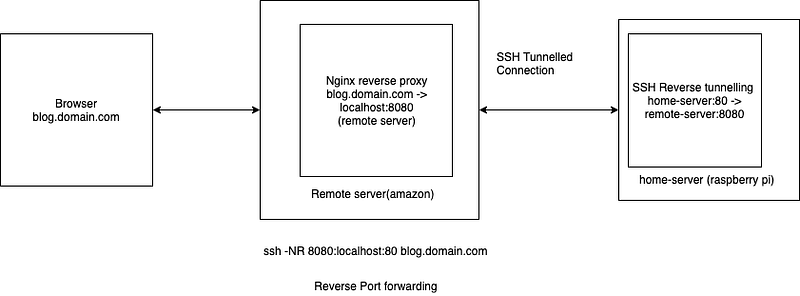
Above the diagram, the home server is tunnelling webserver port 80 to remote server's 8080 port which will accept and relay the connection from remote to home vice-versa. The syntax for reverse ssh tunnelling is below.
ssh -NR 8080:localhost:80 user@remote-server-ip
Where:
- N = Do not execute a remote command.
- R = Remote SSH port forwardings
Above the command will make a connection between home server's 80 port and remote's 8080 port which we will use it in Nginx as a reverse proxy to accept request from website. Below there is Nginx reverse proxy config.
server {
    server_name blog.domain.com;
    listen 80;

    location / {
        proxy_set_header X-Real-IP $remote_addr;
        proxy_set_header Host $http_host;
        proxy_pass http://127.0.0.1:8080;
    }
}
Now, when we visit http://blog.domain.com, Nginx will receive the request and pass it to localhost:8080 which is tunnelled with home server's 80 port.