Valet alternative in Docker
Valet is serving great but in some cases, it failed to fulfil the requirement of multiple specific version of PHP and databases. I want to share docker configuration to achieve almost the same configuration as valet using Docker. Below there is a diagram of docker architecture.
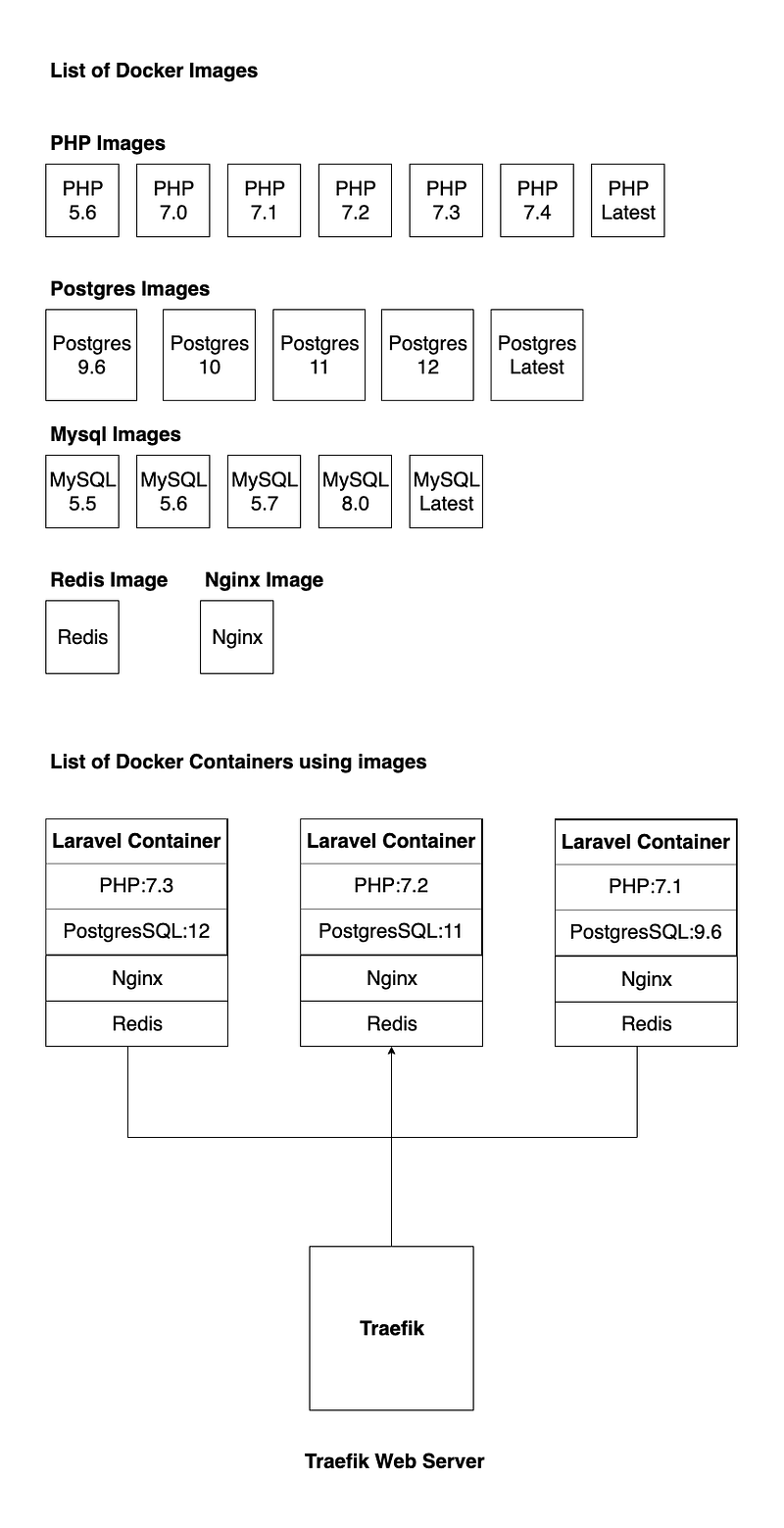
First of all, we prepared docker images which are customizable for Laravel with necessary PHP extensions, Composer and supervisor process manager.
Dockerfile
FROM php:7.0-fpm

ENV APP_HOME /var/www/html

ARG USER_ID=1000
ARG GROUP_ID=1000

# reset www-data uuid for matching host user uuid
RUN userdel -f www-data &&\
    if getent group www-data ; then groupdel www-data; fi &&\
    groupadd -g ${GROUP_ID} www-data &&\
    useradd -l -u ${USER_ID} -g www-data www-data

# install all the dependencies and enable PHP modules
RUN rm -rf /var/lib/apt/lists/partial && apt-get update -o Acquire::CompressionTypes::Order::=gz \
    && apt-get update && apt-get upgrade -y && apt-get install -y \
    procps \
    nano \
    git \
    unzip \
    zip \
    libicu-dev \
    zlib1g-dev \
    libxml2 \
    libxml2-dev \
    libreadline-dev \
    libzip-dev \
    libpq-dev \
    libmcrypt-dev \
    libpng-dev \
    pear-channels \
    supervisor \
    cron \
    && pecl install redis \
    && docker-php-ext-enable redis \
    && docker-php-ext-configure pdo_mysql --with-pdo-mysql=mysqlnd \
    && docker-php-ext-configure pgsql -with-pgsql=/usr/local/pgsql \
    && docker-php-ext-install \
    pdo_mysql \
    pdo \
    pdo_pgsql \
    pgsql \
    bcmath \
    ctype \
    json \
    mbstring \
    mcrypt \
    tokenizer \
    xml \
    intl \
    pcntl \
    xmlrpc \
    soap \
    gd \
    zip && \
    rm -fr /tmp/* && \
    rm -rf /var/list/apt/* && \
    rm -r /var/lib/apt/lists/* && \
    apt-get clean

# create document root
RUN mkdir -p $APP_HOME/public

# change owner
RUN chown -R www-data:www-data $APP_HOME

# put php config dir for Laravel
RUN mkdir -p /usr/local/etc/php-fpm.d/

# install composer
RUN curl -sS https://getcomposer.org/installer | php -- --install-dir=/usr/bin/ --filename=composer

# add supervisor
RUN mkdir -p /var/log/supervisor
RUN mkdir -p /var/spool/cron/crontabs/

# set working directory
WORKDIR $APP_HOME

# create composer folder for user www-data
RUN mkdir -p /var/www/.composer && chown -R www-data:www-data /var/www/.composer

USER www-data
PostgreSQL docker-compose
version: "3.7"

services:
  db:
    image: "postgres:10.11"
    container_name: "postgres_10.11"
    ports:
      - "5410:5432"
    volumes:
      - ~/.docker-stack/postgresql/10:/var/lib/postgresql/data
    networks:
      - postgresql

networks:
  postgresql:
    name: postgresql_10
Laravel Container docker-compose
version: '3.7'

services:
  nginx:
    image: nginx
    container_name: "${APP_NAME}_nginx"
    restart: always
    volumes:
      - .:/var/www/html:ro
      - ./docker/nginx:/etc/nginx/conf.d/
    depends_on:
      - laravel
    links:
      - "laravel: ${APP_NAME}_laravel"
    labels:
      - "traefik.http.routers.${APP_NAME}.rule=Host(`${APP_NAME}.localhost`)"
      - "traefik.http.services.${APP_NAME}.loadbalancer.server.port=80"
      - "traefik.http.services.${APP_NAME}.loadbalancer.passhostheader=true"
      - "traefik.enable=true"
      - "traefik.docker.network=traefik_web"
    networks:
      - laravel
      - traefik_web

  laravel:
    image: php-70:latest
    container_name: "${APP_NAME}_laravel"
    command: bash -c "/usr/bin/composer install --no-interaction --no-progress && php-fpm & php -a"
    expose:
      - "9000"
    volumes:
      - .:/var/www/html
      - ./docker/php/www.conf:/usr/local/etc/php-fpm.d/www.conf
      - ./docker/php/php.ini:/usr/local/etc/php/php.ini
      - $HOME/.composer:$HOME/.composer
    external_links:
      - "db:postgres_12"
      - "redis: ${APP_NAME}_redis"
    networks:
      - laravel
      - traefik_web
      - postgres

  supervisord:
    image: php-70:latest
    container_name: "${APP_NAME}_supervisord"
    user: root
    volumes:
      - ./docker/php/supervisord.conf:/etc/supervisor/conf.d/supervisord.conf
      - ./docker/php/crontab:/var/spool/cron/crontabs/root
      - .:/var/www/html
    external_links:
      - "db:postgres_12"
      - "redis: ${APP_NAME}_redis"
    networks:
      - laravel
      - postgres
    command: ["/usr/bin/supervisord"]

  redis:
    image: redis:5.0.7-alpine3.11
    container_name: "${APP_NAME}_redis"
    expose:
      - "6379"
    volumes:
      - ./docker/redis:/var/lib/redis
    restart: always
    networks:
      - laravel
      - traefik_web

networks:
  laravel:
    name: ${APP_NAME}
  traefik_web:
    external:
      name: traefik_web
  postgres:
    external:
      name: postgresql_12
Setup Traefik as they instructed in official doc. After we set up everything we have to just start laravel container which will be automatically accessible from Traefik automatic discovery.